Premium Store Capture Tools
Getting alpha out of a custom URP pipeline, and three editor tools so the Capture Artists stopped fighting the scene.
The problem
Every update ships 80 to 100 new items, grouped in bundles, each bundle needing one render. The custom URP could not output an alpha channel, so everything was shot against a green or magenta screen and keyed by hand.
Outfits were the worst case: three captures each, timelines and animation tracks added by hand to the character and to every piece of clothing, and the body poking through half of the garments. The brief ended every discussion with "the 2D artist will cover that" — in overtime.
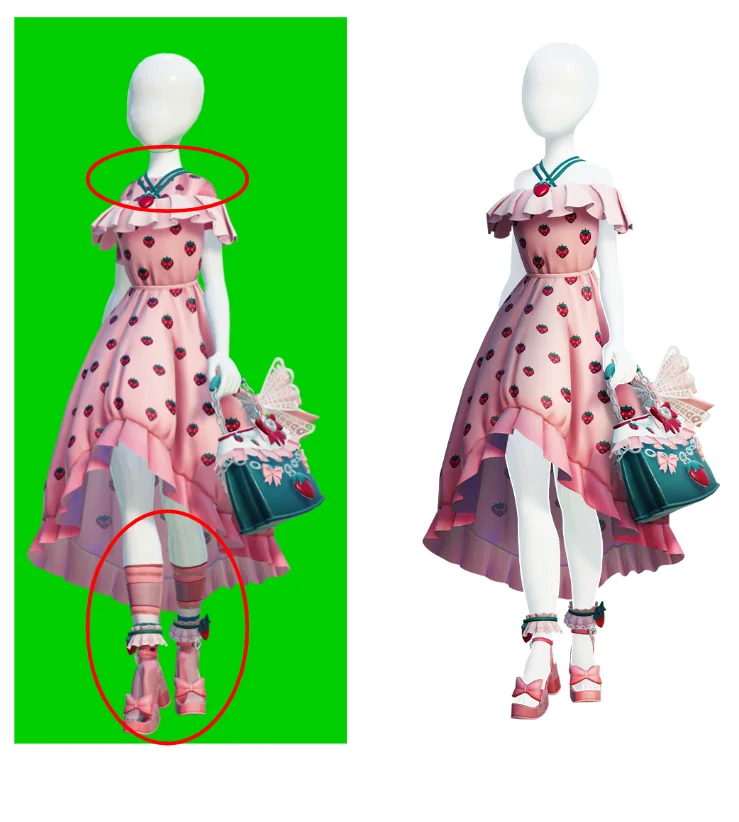
Alpha, with post processing
First version: two recorders, one colour pass on black and one transparent pass without post, composited in Blender. Faster than keying, but a detour.
The fix was one setting. Raising the HDR precision of the render pipeline asset to 64 bit made the compositing step obsolete — transparent output with post processing effects and clean masks, in engine.
Three editor tools for avatar outfits
An outfit is a body prefab plus one prefab per garment, all of them expecting runtime systems that do not run in the editor. Clothing Masker replays the runtime hiding step — reads the clothing scripts, applies the overlap exceptions, swaps the matching slots for a transparent material, and can split skin from garment by vertex alpha on a mesh clone. Material Switcher turns any matte into a toggle. Pose Cycler swaps the clip on every animation track of the timeline at once, so the Capture Artist never opens the Timeline window. All three store the original state and restore it.
“I would say on average I save about 50% of my time. Each asset that needs no paintover saves at least 30 mins, sometimes more.”
— Lead 2D Artist
Next steps
- Read bundle specs and project paths from a Jira CSV export and instance each bundle automatically.
- Separate VFX into its own pass with a fake depth pass, for buildings where the effects have to read on top.